What event program automation is
Event program automation is the practice of generating every program document of a conference or summit from one structured session list. The team edits the data once, and the program, the at-a-glance page, the agenda, the run of show, the speaker briefs and the reports are regenerated from it.
The session list usually lives in Airtable or Google Sheets. The output is a finished Google Slides or Google Docs file in the team’s own design, with a PDF copy when needed. In British English the same thing is called conference programme automation.
Few people search for this term. They search for an event program template, a conference agenda template or a run of show template. Then the program changes for the tenth time, and the template is no longer the problem. This page covers what comes next: the full family of documents, the data behind them and a working template for each.
Example: The program, generated from the session list.
 Sessions Airtable
| Session | Stage | Time |
|---|---|---|
| The next decade of Nordic compute | Main Stage | 09:00 |
| Who pays for the grid | Main Stage | 10:45 |
| Building in public | Main Stage | 13:30 |
Each row becomes a line in the program.
 Nordic Tech Summit 2027 · Official program Google Slides PDF
Every row lands in one finished program, saved to your Google Drive.
The document family
An event team produces seven program documents. They look different and go to different readers. They all read the same sessions, speakers and participants. The samples below show one fictional event, Nordic Tech Summit 2027, so you can follow the same sessions from one document to the next.
01 Google Slides
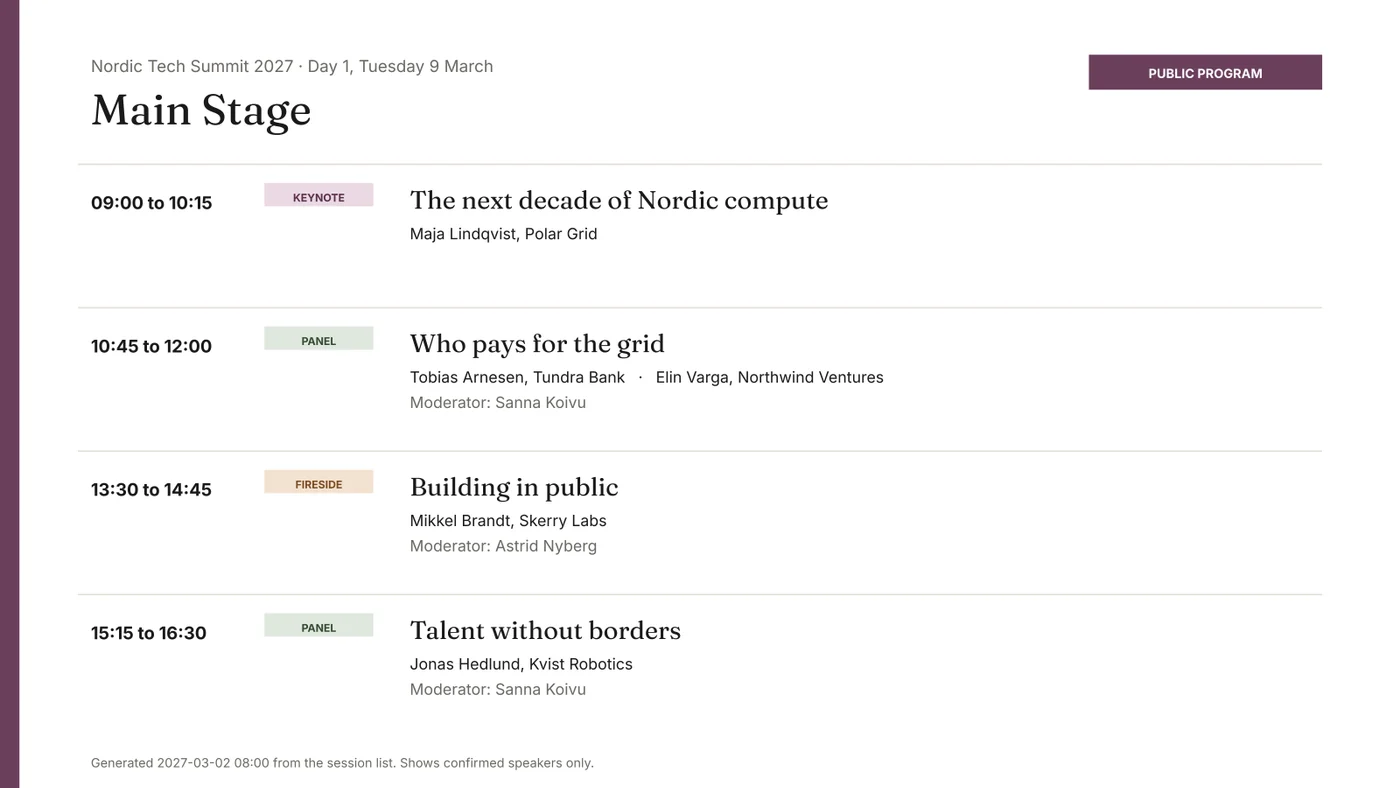
Full program
The full program is the long-form document of the whole event: every day, stage and session, with speakers and moderators.
- Who reads it
- Attendees, speakers and sponsors read the public version. The program team reads the internal version.
- Data it uses
- Days, stages, sessions, speakers, moderators, session type, visibility and speaker status.
- Variants
- Internal and public. The internal version colours each speaker by status. With or without speakers. With or without moderators. Per day, per stage, per language.
- Regenerates
- Daily during preparation, then on demand.
02 Google Slides
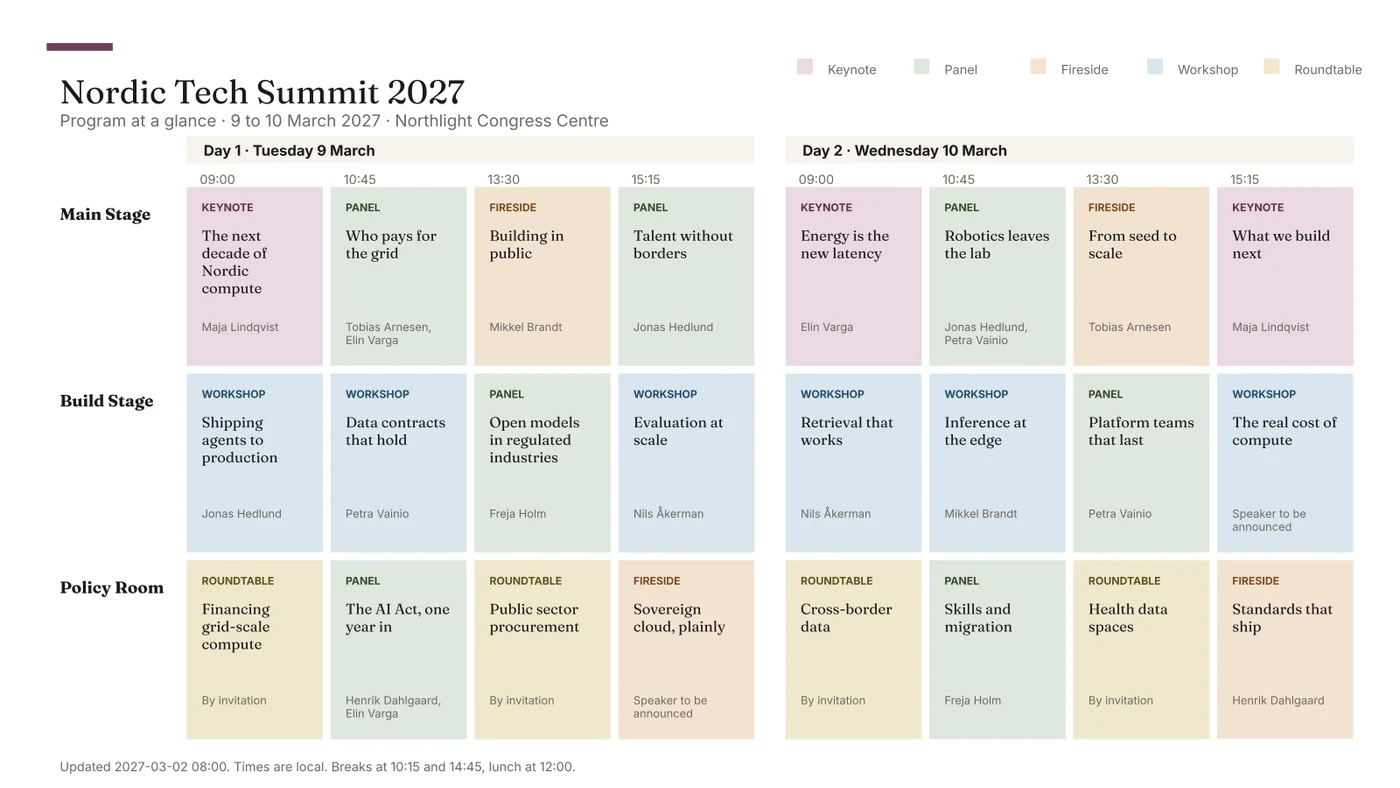
Program at a glance
A program at a glance is a one or two page grid of the whole event: days across, stages down, one cell per session. Also called a schedule at a glance or a pocket program.
- Who reads it
- Attendees, registration desk staff and anyone who needs to see the whole event at once.
- Data it uses
- Sessions sorted by stage, day and start time, with session type and confirmed speakers.
- Variants
- Whole event or per day. Print and screen sizes.
- Regenerates
- With every program change.
03 Google Docs
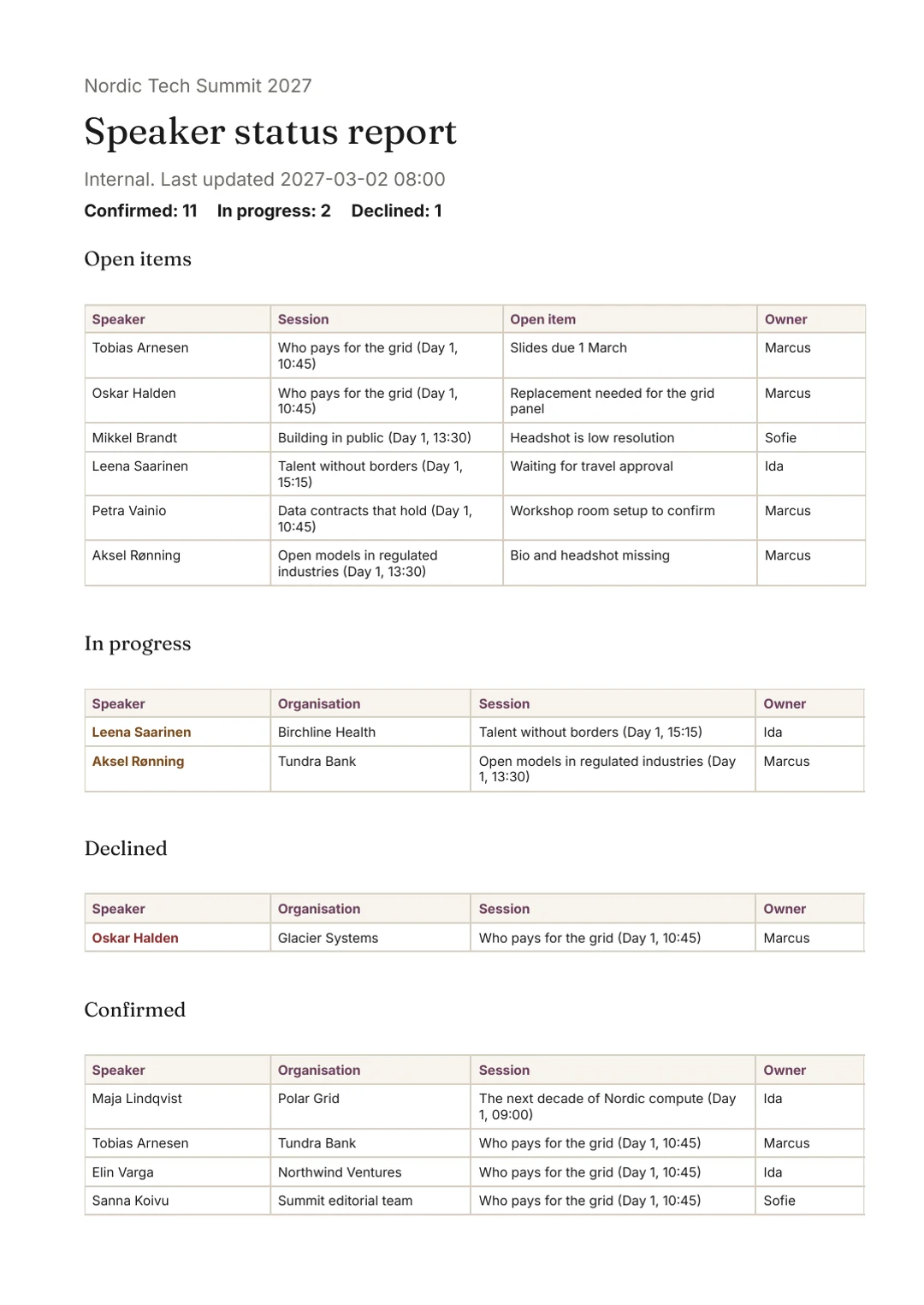
Speaker status report
A speaker status report is an internal list of every speaker grouped by status: confirmed, in progress or declined, with open items.
- Who reads it
- The program director and the speaker management team. It is internal only.
- Data it uses
- Speakers with status, owner, open item and session.
- Variants
- Grouped by status, by session or by owner.
- Regenerates
- Weekly in early planning. Daily in the final weeks.
04 Google Docs
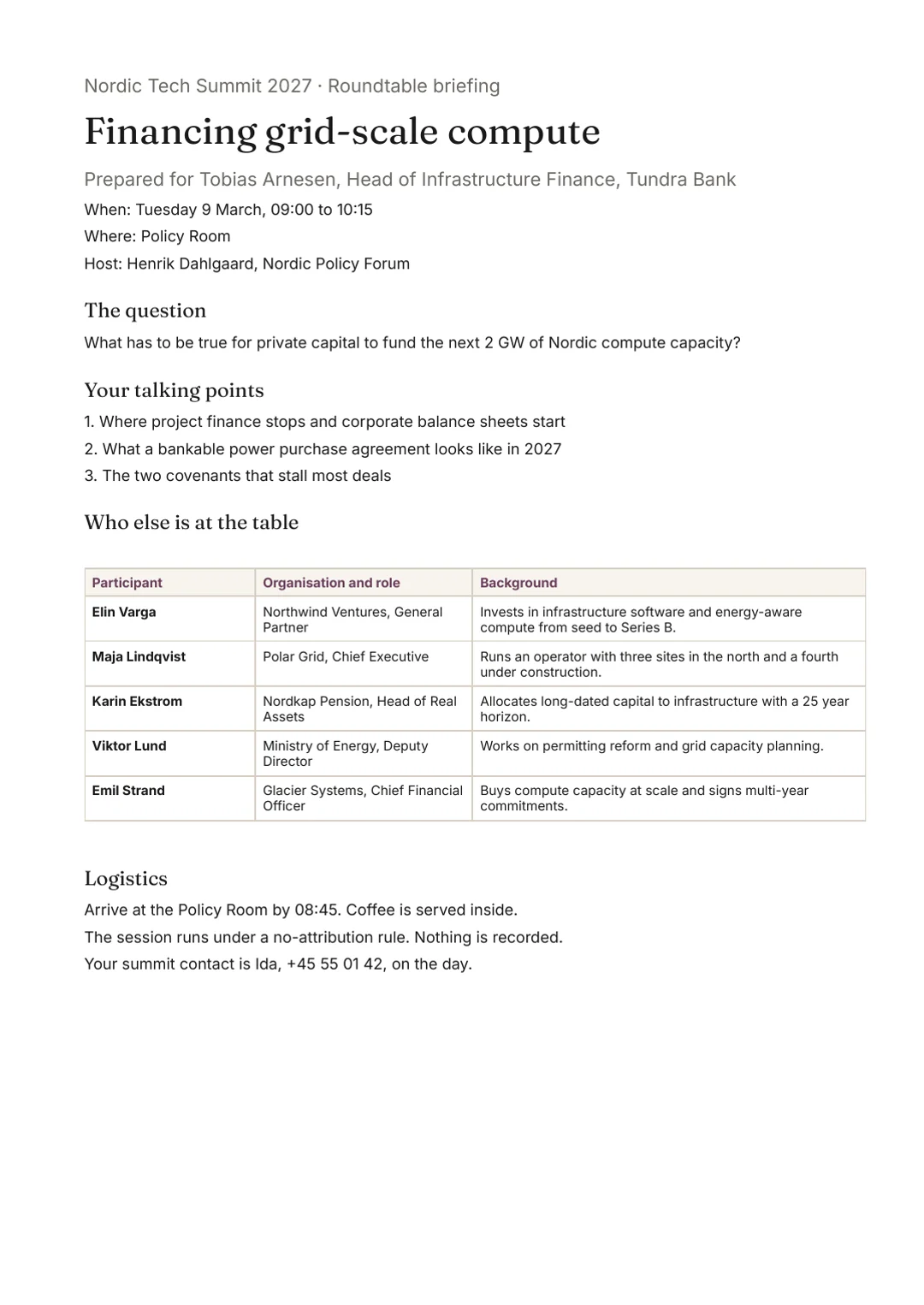
Roundtable briefing notes
Roundtable briefing notes are one document per participant per roundtable, with the topic, the host, the other participants and that person’s own talking points. A combined pack of briefings for one person is called a briefing book.
- Who reads it
- Each roundtable participant, and their office. The host gets a version with everyone’s talking points.
- Data it uses
- Roundtables and participants: biography, talking points and logistics per participant.
- Variants
- Per participant, per roundtable, host version.
- Regenerates
- Before each roundtable, and on demand when the guest list changes.
05 Google Docs
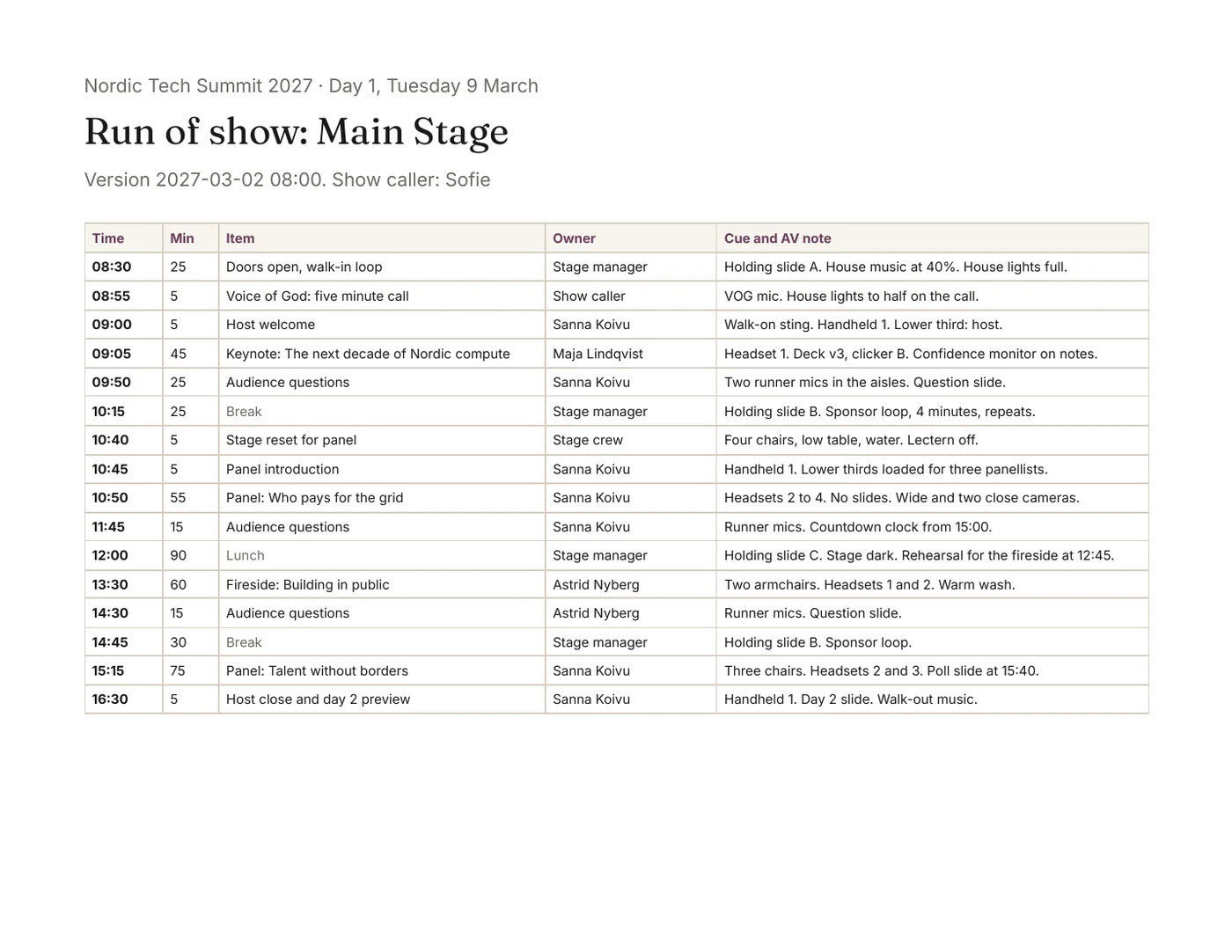
Run of show
A run of show is a minute-by-minute running order for one stage, with an owner and a technical cue on every row. Also called a run sheet, show flow, program flow or cue sheet.
- Who reads it
- The show caller, the stage manager and the AV crew.
- Data it uses
- Cues linked to sessions: time, duration, item, owner and AV note.
- Variants
- Per stage, per day.
- Regenerates
- Daily in the final week.
06 Google Docs
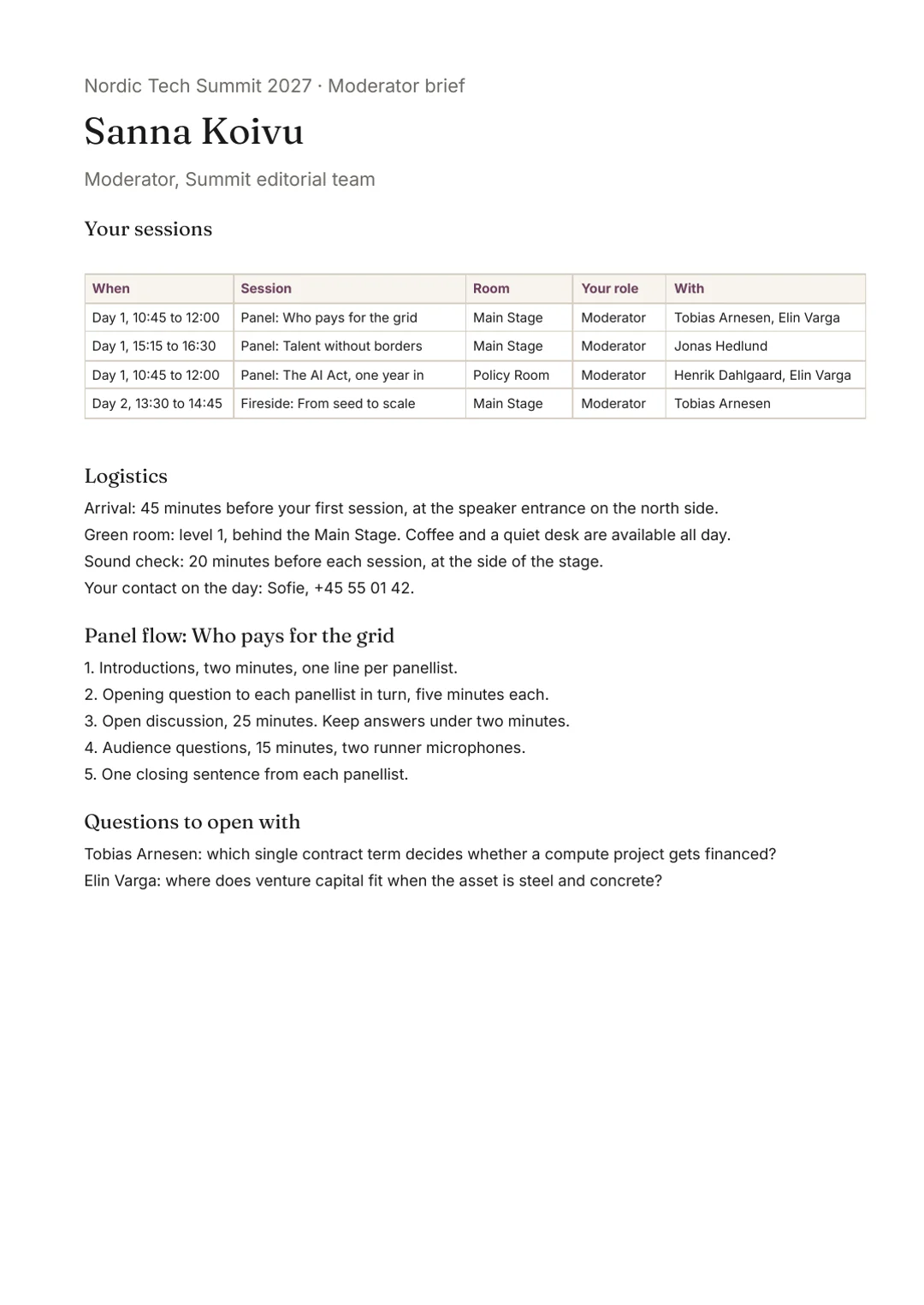
Speaker and moderator brief
A speaker brief is one document per speaker with their own sessions, times, rooms, co-speakers and logistics. The moderator version adds the panel flow and opening questions. A speaker brief plus that person’s roundtable briefings makes a briefing book.
- Who reads it
- Each speaker and each moderator.
- Data it uses
- Speakers with their linked sessions, role per session and logistics fields.
- Variants
- Speaker and moderator.
- Regenerates
- On confirmation, and on every change to that speaker’s sessions.
07 Google Docs
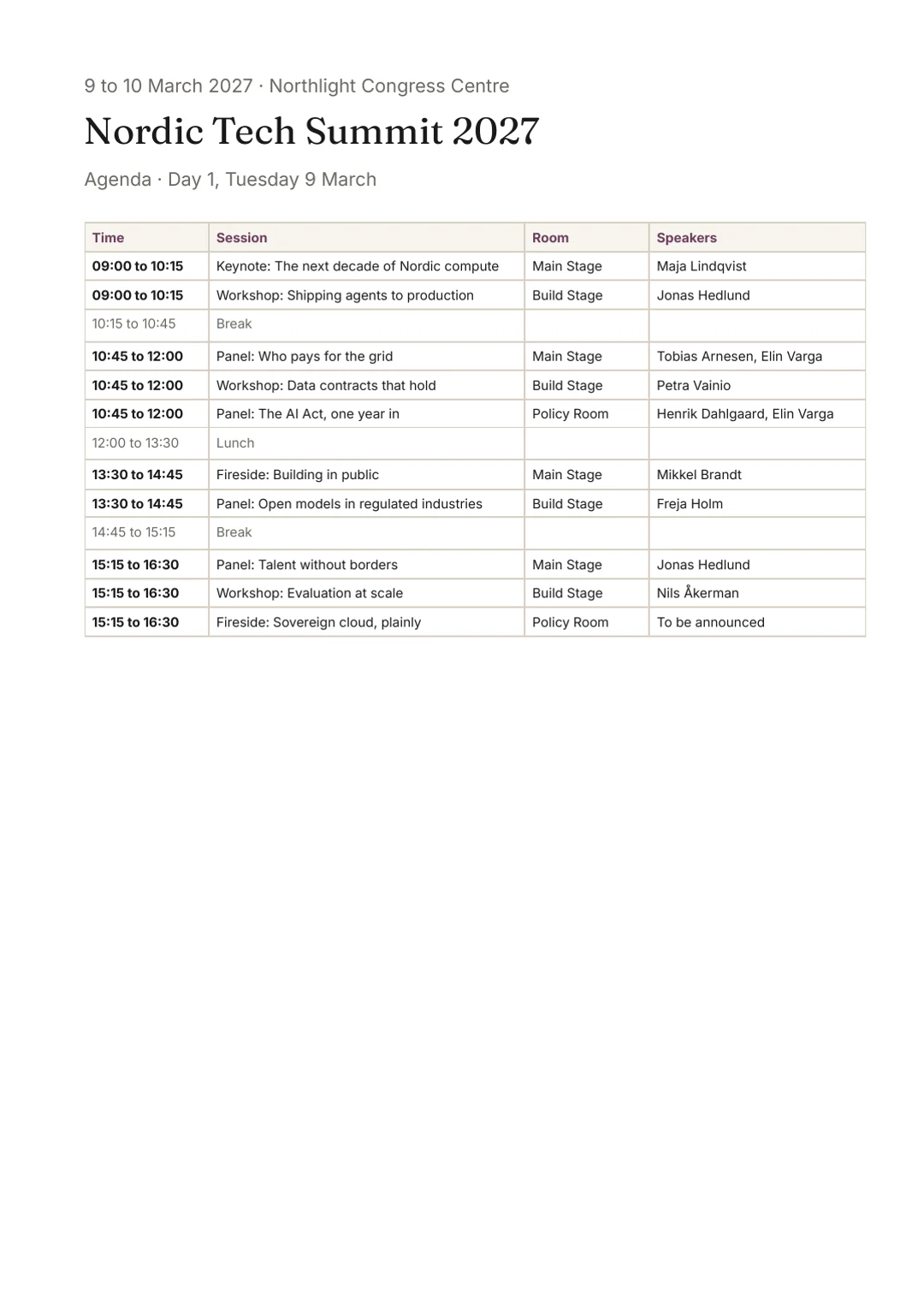
Conference agenda
A conference agenda is the running order of sessions with times, rooms and speakers, as a plain table.
- Who reads it
- Attendees, by email, on the website and on paper.
- Data it uses
- Public sessions with start, end, room and confirmed speakers.
- Variants
- Per day, per track.
- Regenerates
- With every program change.
Templates for every event document
Each of the seven documents has a working template. Every template is a real Google Slides or Google Docs file. Copy it to your Drive and fill it by hand, or connect your session list and generate it. The event program template is the place to start if you only need one.
 Google Slides
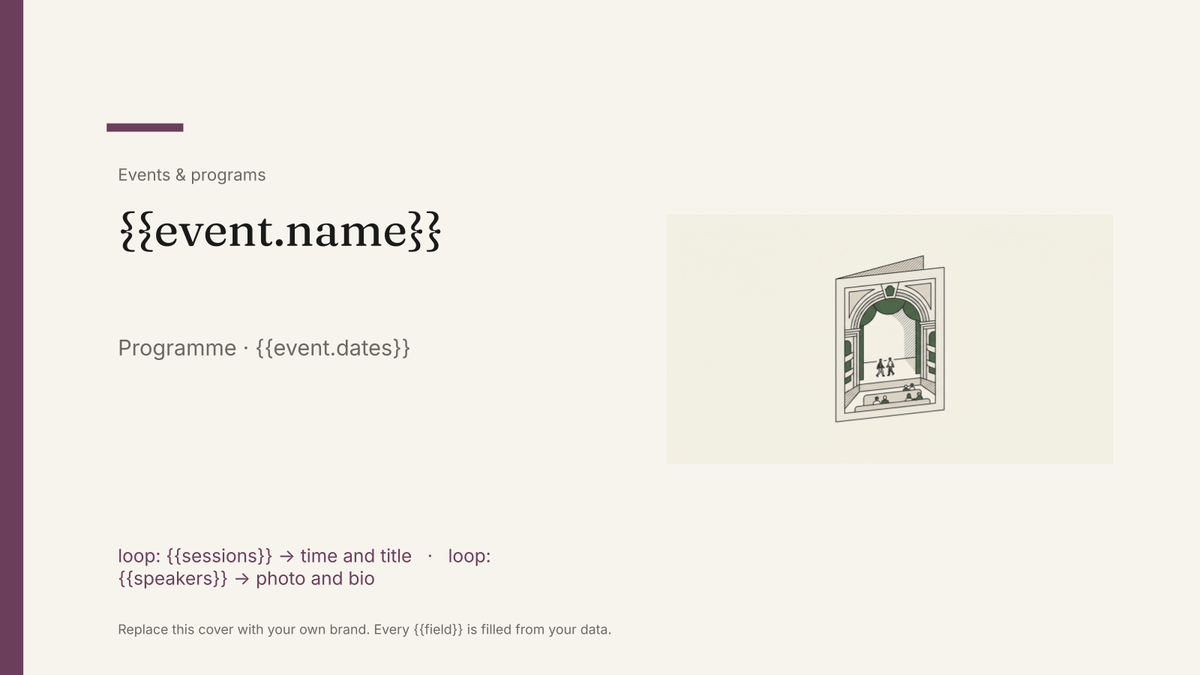
Event program template
A designed programme booklet for an event, generated per event from the session and speaker list.
View template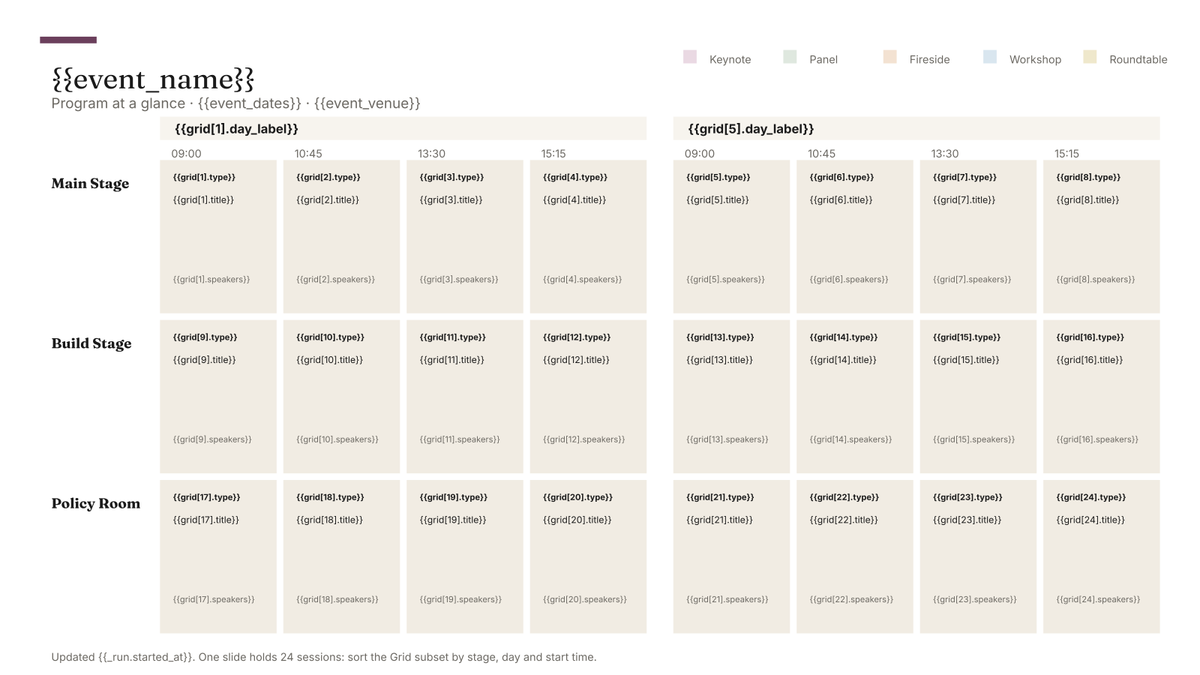 Google Slides
Program at a glance template
The whole event on one page: day columns, stage rows, a time grid and a colour for each session type.
View template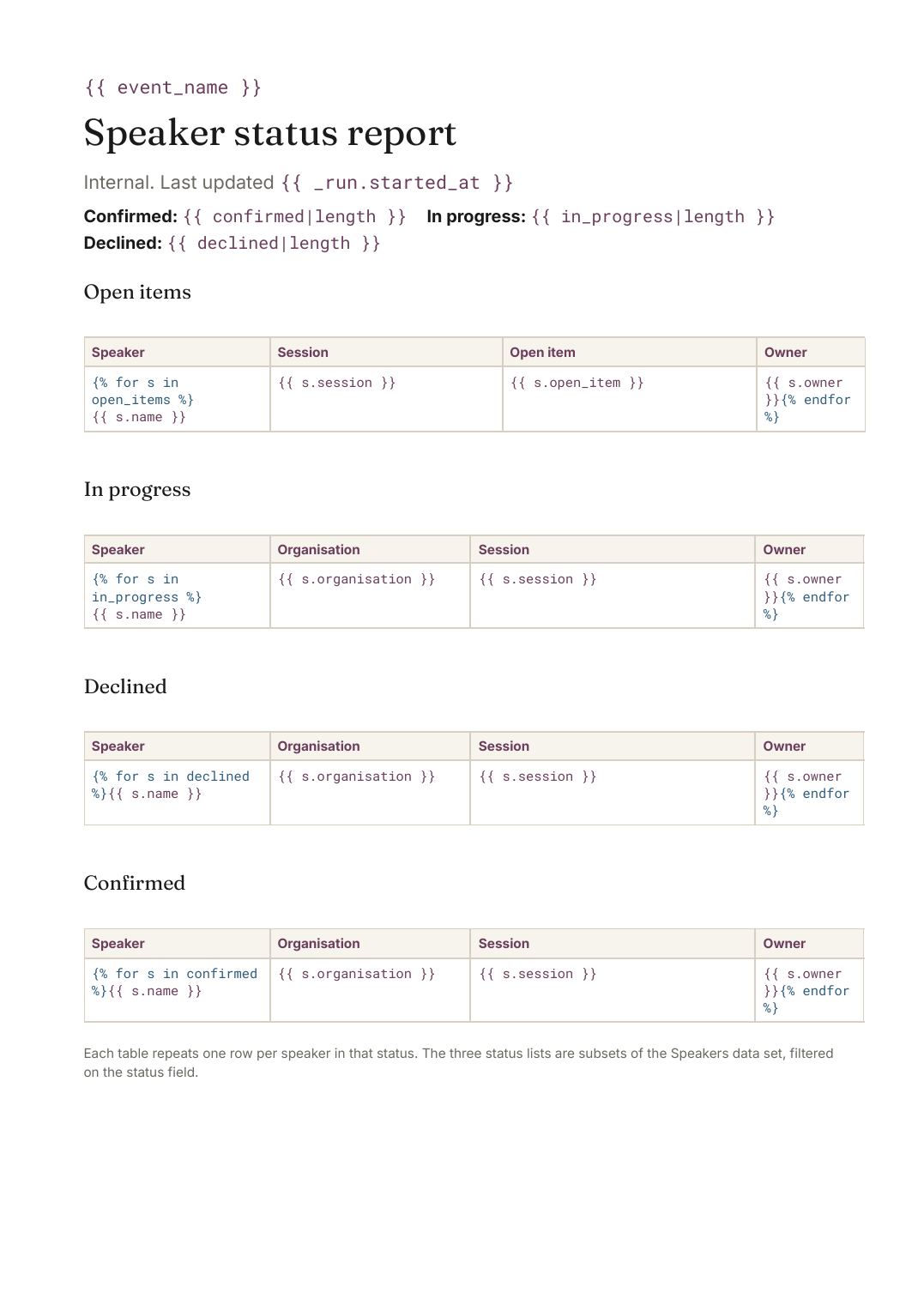 Google Docs
Speaker status report template
An internal report of every speaker grouped by status, with counts, open items and a last-updated stamp.
View template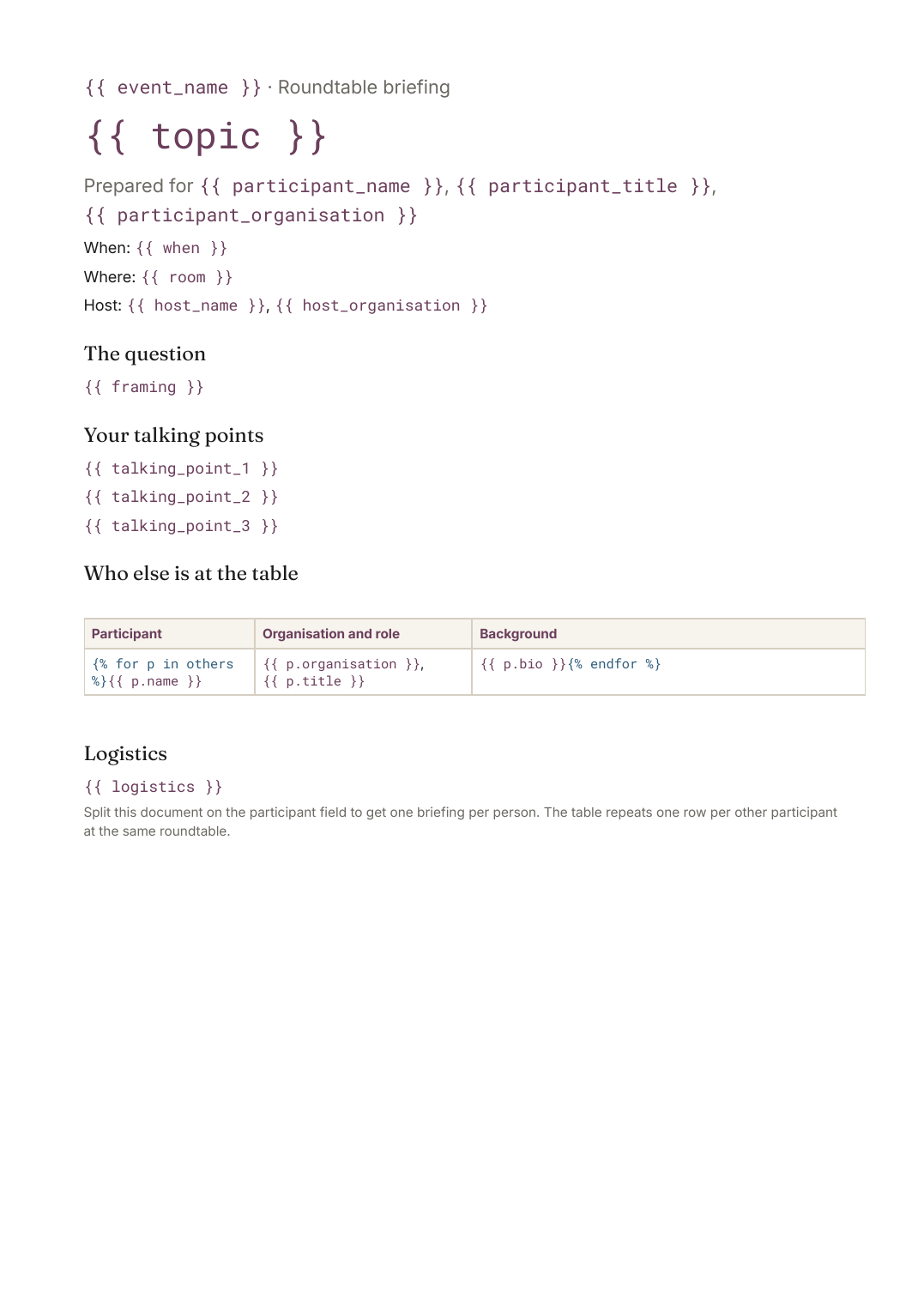 Google Docs
Roundtable briefing template
A pre-session briefing for one roundtable participant: the topic, the host, who else is at the table, their own talking points and logistics.
View template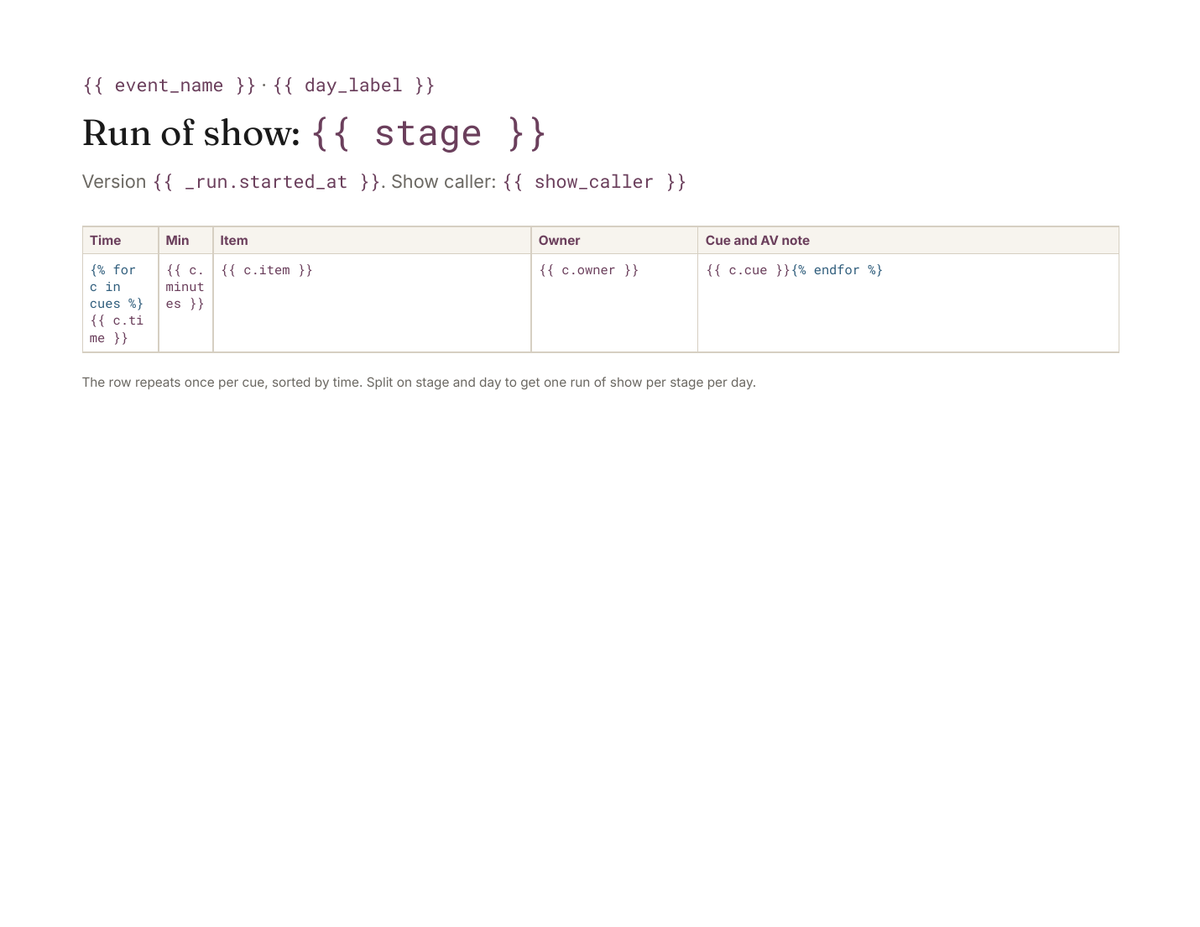 Google Docs
Run of show template
A minute-by-minute running order for one stage on one day, with an owner and an AV cue on every row.
View template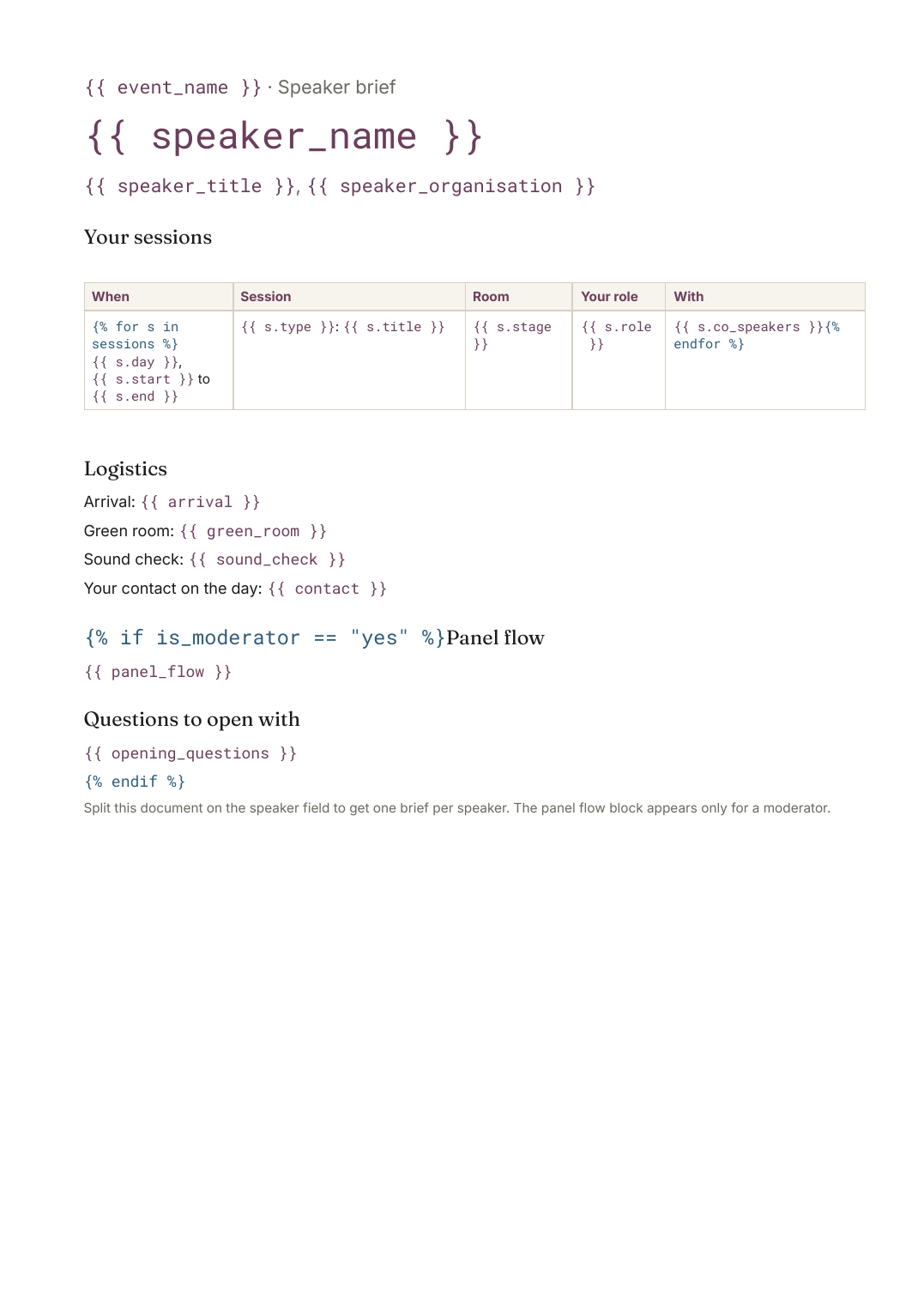 Google Docs
Speaker brief template
One brief per speaker: their own sessions, times, room, co-speakers, moderator and logistics, with a panel flow block for moderators.
View template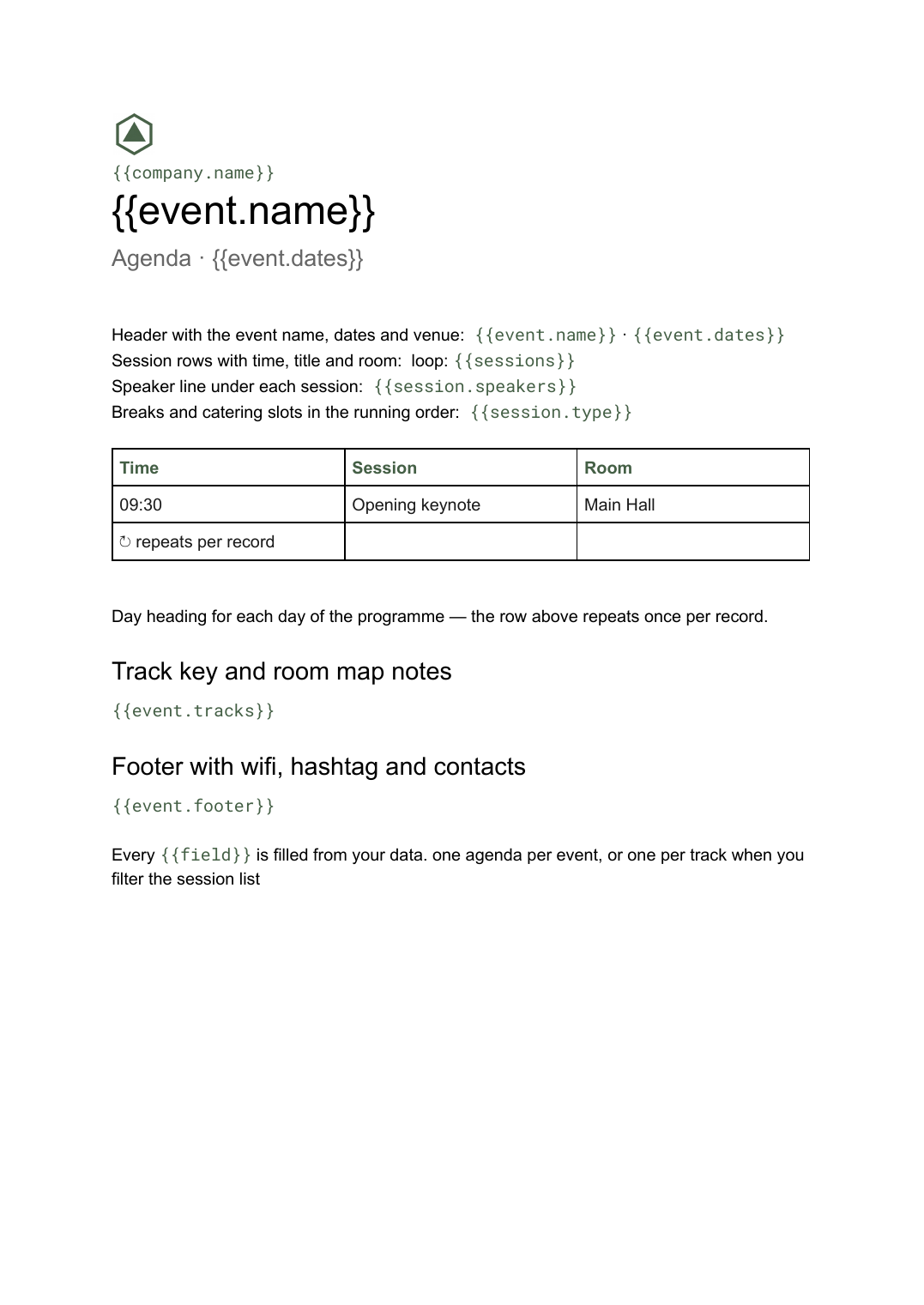 Google Docs
Conference agenda template
A running order of sessions with times, rooms and speakers, generated per event or per track from your session list.
View templateRelated event documents
- Name tag and badge template Google Slides A printed conference badge with name, organisation and ticket type, generated one per attendee from the registration list.
- Table tent template Google Slides A folded card that stands on a table, generated one per table, guest or dish from your event data.
- Event ticket template Google Slides A printable ticket carrying the event, seat and booking reference, generated one per booking from your registration data.
- Sponsorship deck template Google Slides A sponsorship pitch with audience figures and package tiers, generated one per prospect from your event data.
- Travel itinerary template Google Docs A day-by-day schedule of travel, sessions and logistics, generated per trip or per attendee from your schedule data.
One program, many versions
A program is never one document. The team needs an internal version with every speaker and status. Attendees get a public version with confirmed names only. A teaser goes out before the speakers are announced. Each version is the same template with a different filter and a few conditions.
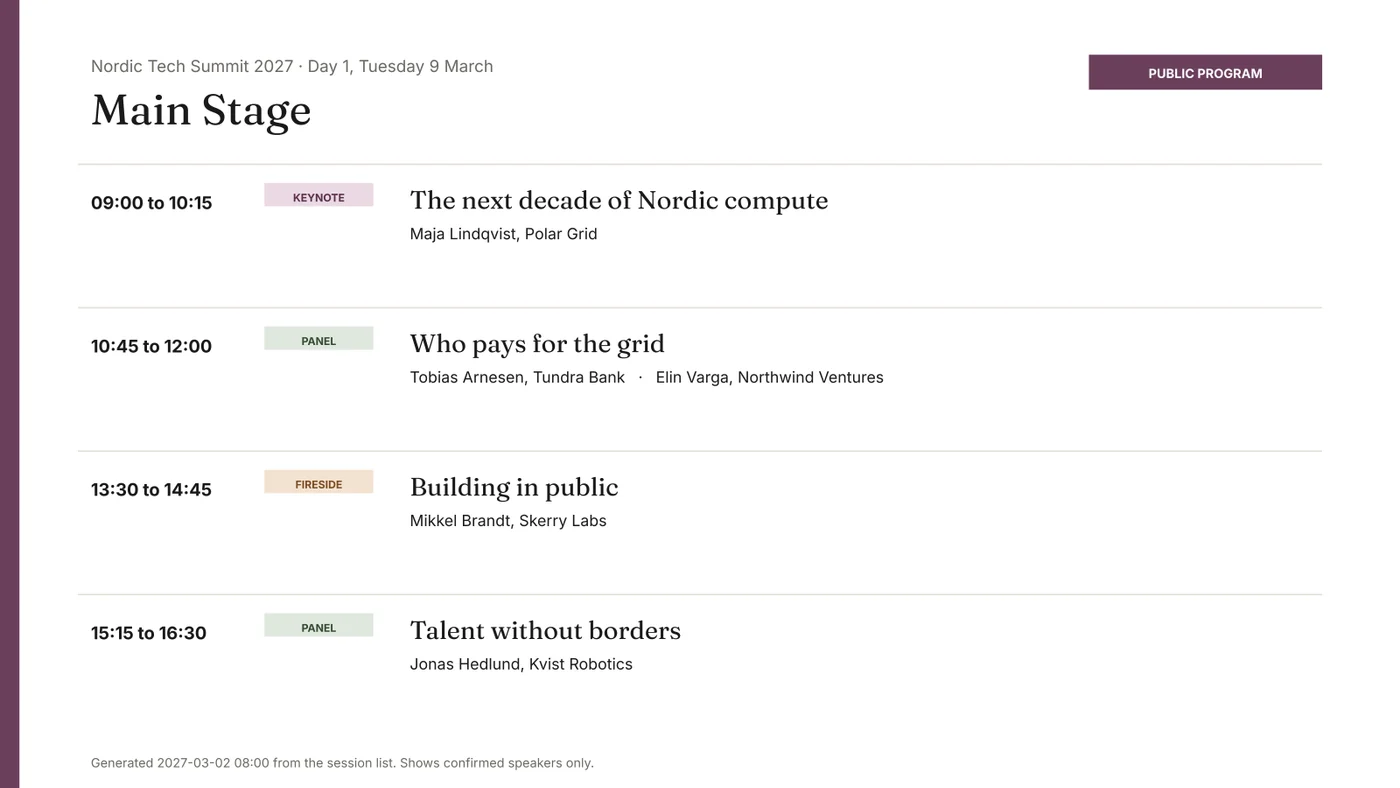
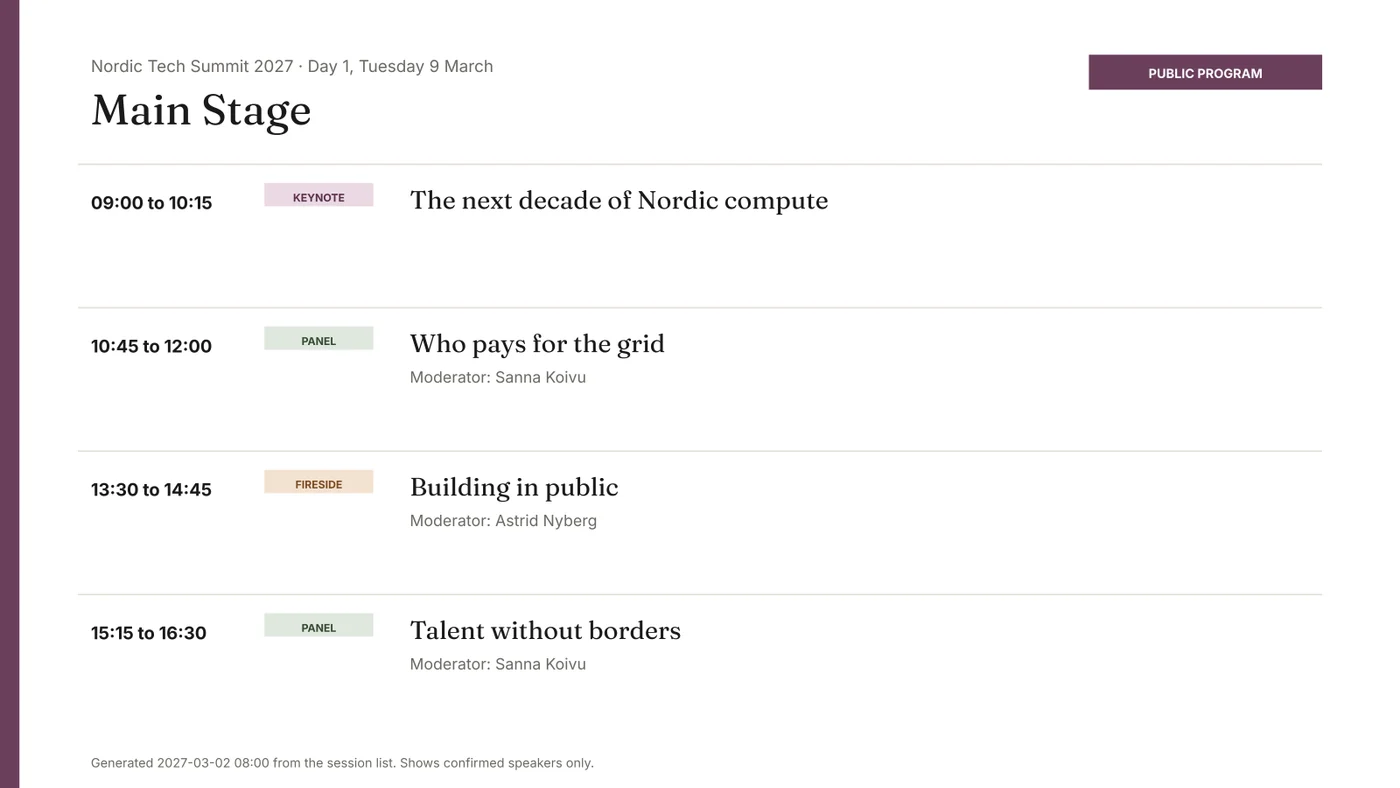
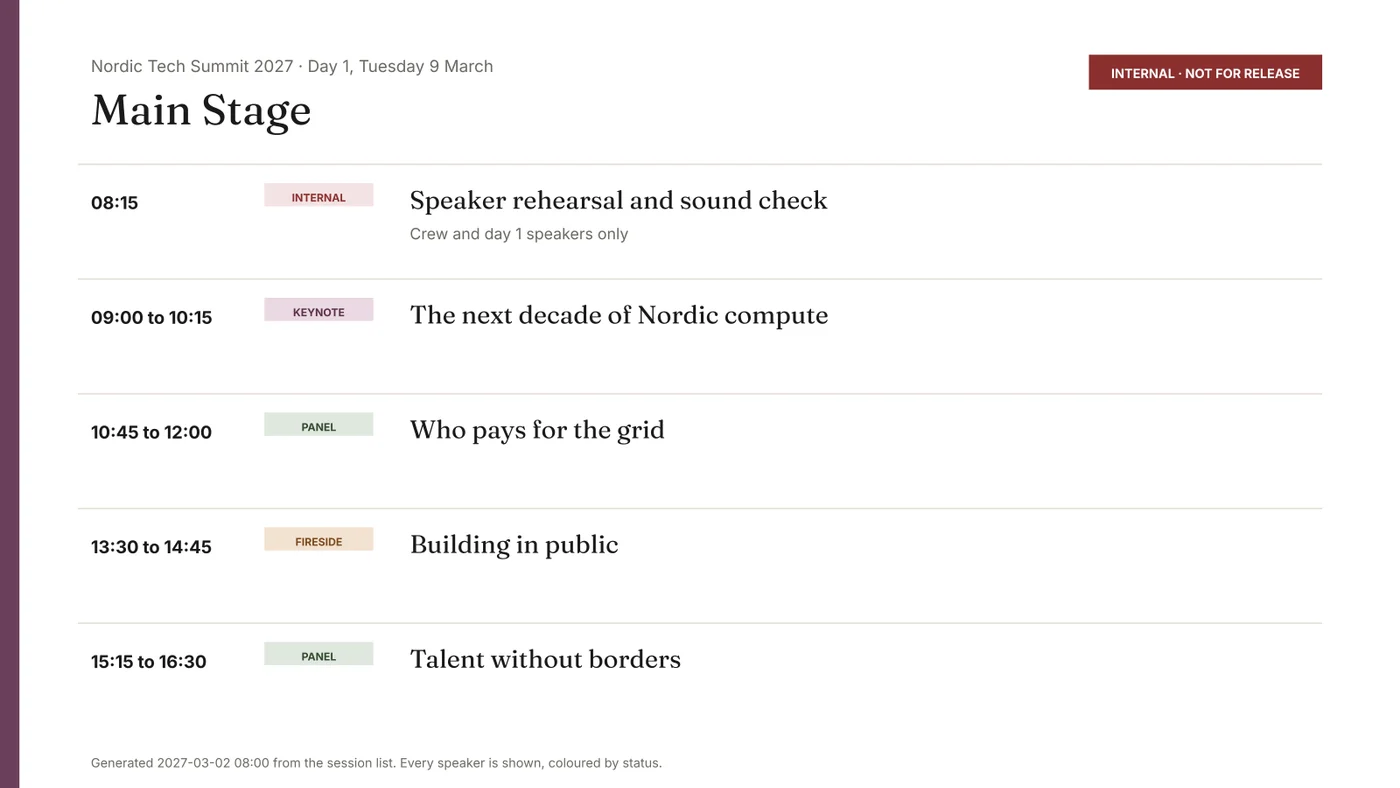
Use the switches to change the version. The page is the Main Stage on day 1 of the sample event.
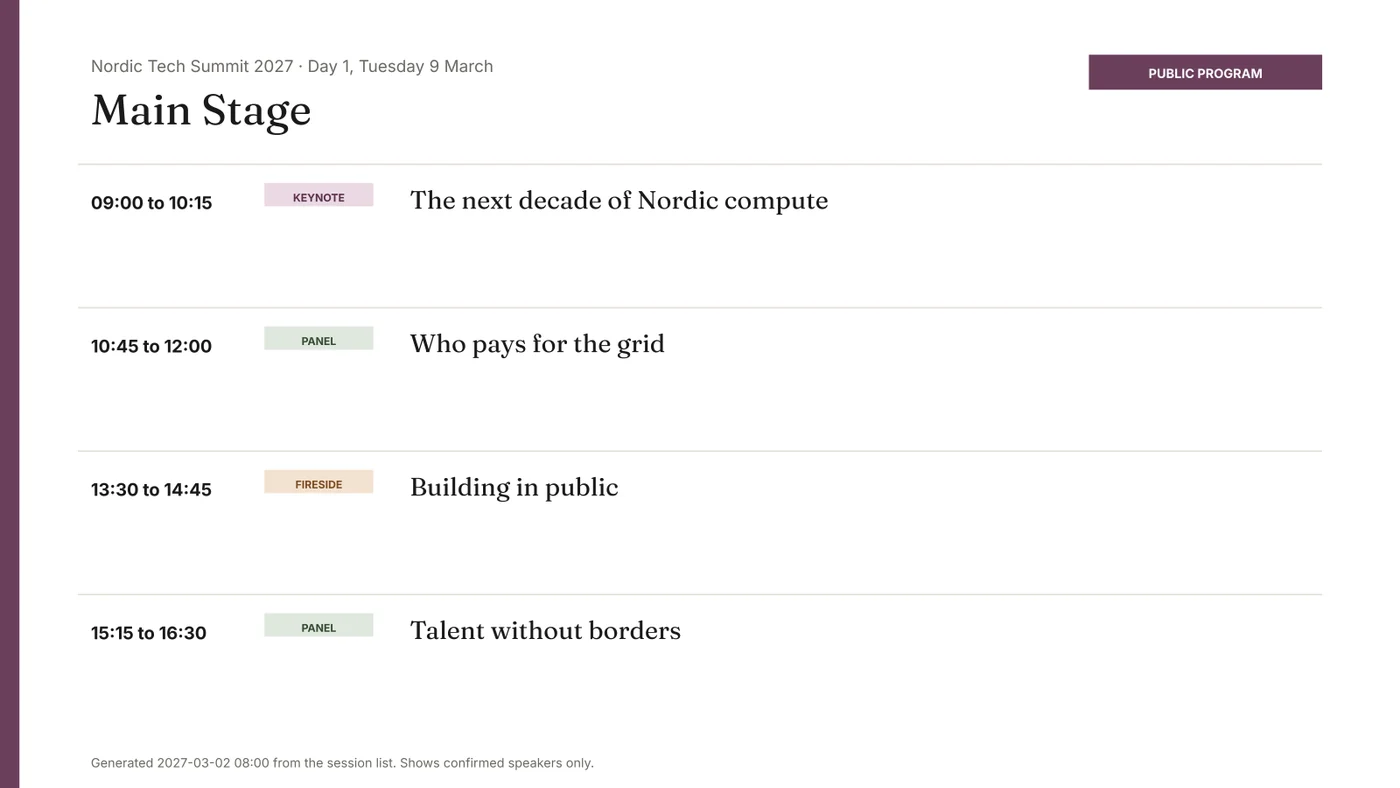
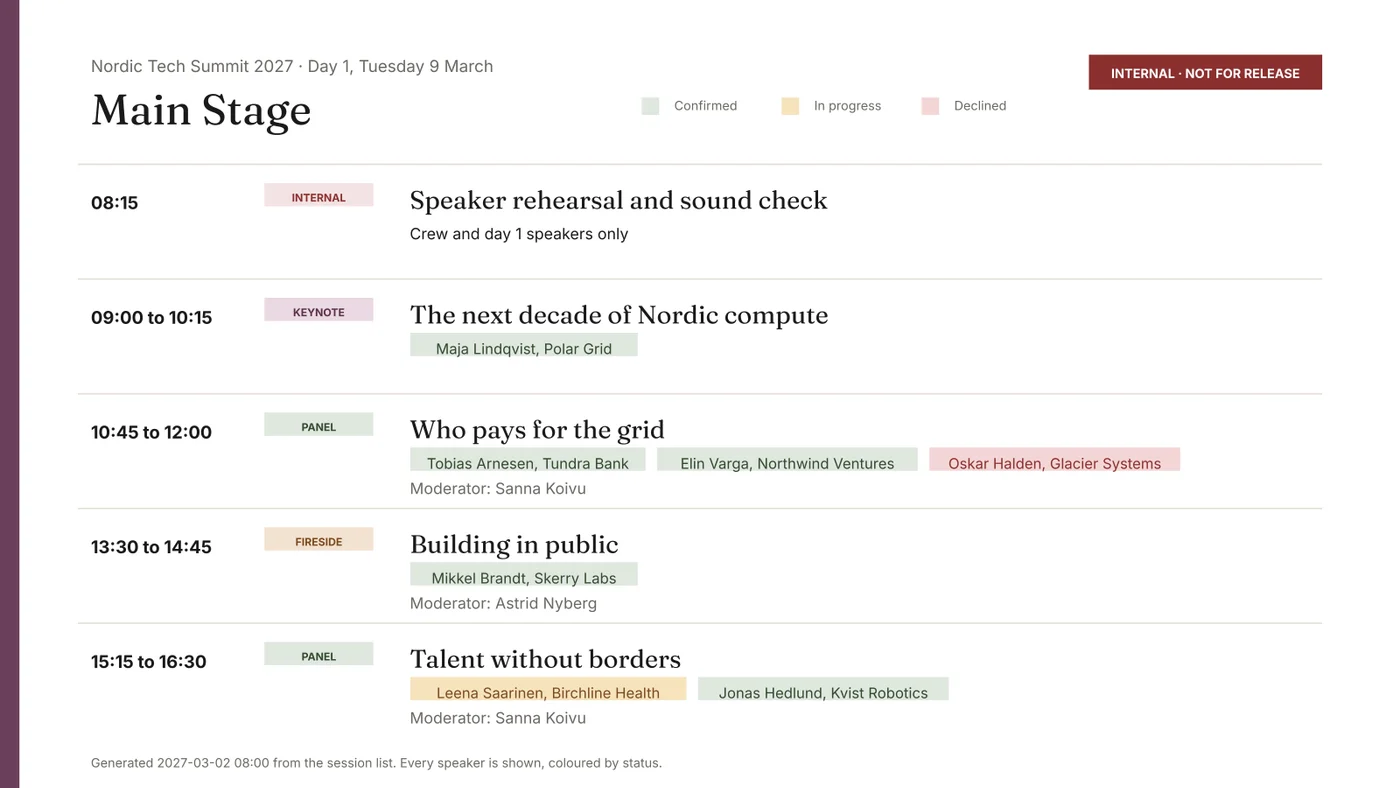
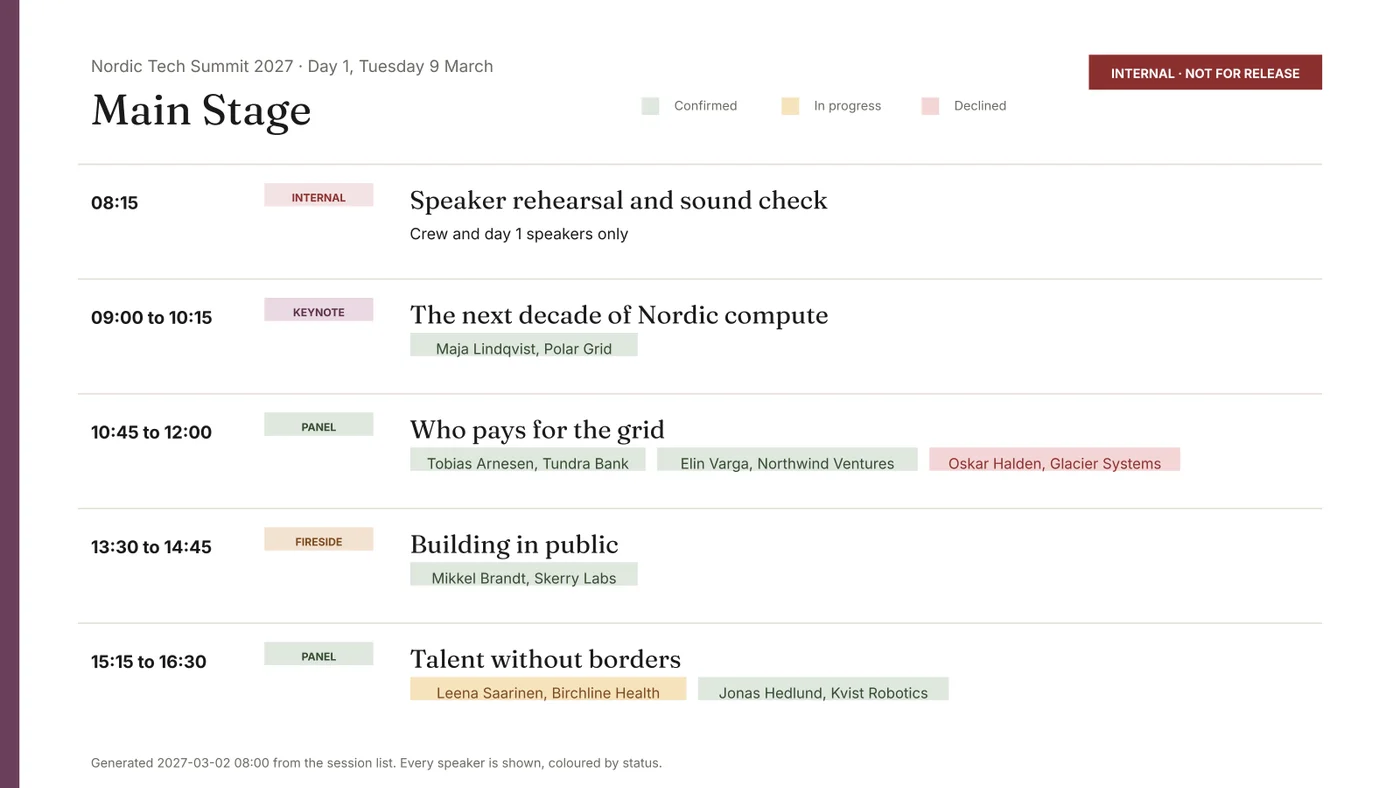
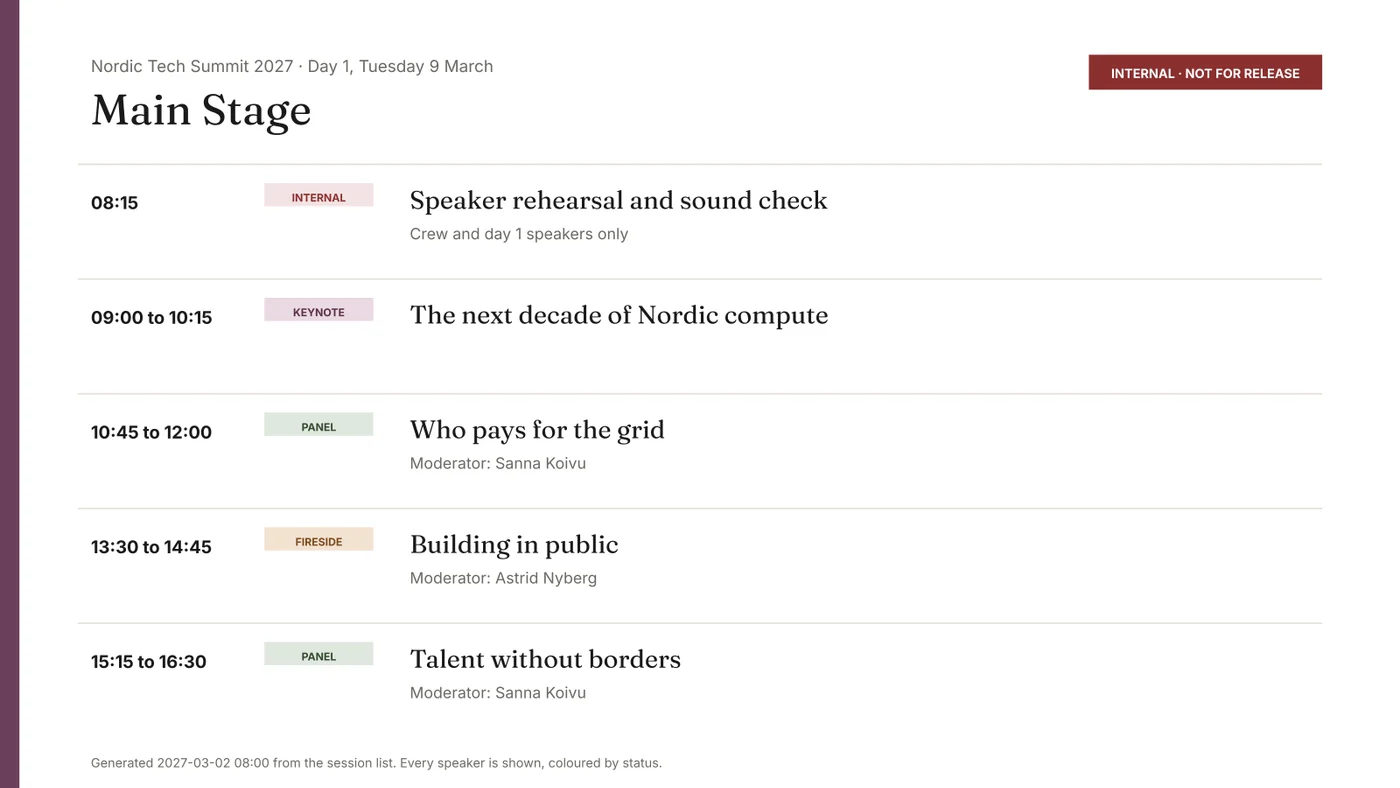
| Version | Filter on the data | What it shows | Reader |
|---|---|---|---|
| Internal | All sessions, all speakers | Every speaker on a chip coloured by status, crew-only rows | Program team |
| Public | Visibility is public, status is confirmed | Confirmed speakers and moderators | Attendees, sponsors |
| Public, no speakers | Visibility is public | Session titles, times and types | Early announcement |
| Per day | Day equals one value | One day of the program | Daily handout |
| Per stage | Stage equals one value | One stage of the program | Stage door, stage team |
| Per language | Language equals one value | Sessions held in that language | Attendees by language |
Each row of the table is a saved subset of the session list. A subset holds its own filters and sort order, and filters combine with AND. Speaker status drives two things in the template. In the public version a condition leaves the unconfirmed speaker out. In the internal version each speaker sits on a chip whose colour comes from the status: green for confirmed, amber for in progress, red for declined. The team sees the open slots on a page without reading a word.
What changes when a speaker declines
One week before the event a panellist declines. In a hand-built workflow somebody opens every file and searches for the name. With one data source the change is one field. Here is what happens to each of the seven documents.
One field changes in the speaker list
Oskar Halden Panel: Who pays for the grid · Day 1, 10:45, Main Stage
Confirmed changes to Declined
-
Full program Updates
In the internal version his chip turns from green to red. The public version drops his name from the panel line.
-
Program at a glance Updates
His name leaves the cell for the 10:45 panel. The cell now shows two speakers.
-
Speaker status report Updates
Confirmed goes from 12 to 11. Declined goes from 0 to 1. A new open item appears: replacement needed for the grid panel.
-
Roundtable briefing notes No change
No change. He was not on a roundtable guest list, so no briefing mentions him.
-
Run of show Updates
The panel row is regenerated from the session. The crew updates one cue note by hand: two panellist microphones, two lower thirds.
-
Speaker and moderator brief Updates
The two remaining panellists and the moderator get a new brief without his name. His own brief is no longer generated.
-
Conference agenda Updates
His name leaves the speaker column for the 10:45 panel.
6 of 7 documents change. Each one is regenerated from the same list on its next run.
Why a template alone is not enough
An event program template solves the layout problem. Someone has decided what a session block looks like, where the time goes and where the speaker photo sits. You need that. The template still cannot tell you when it is out of date.
The costly moments in event production come after the layout is done. A speaker drops out two days before the event. A room is reassigned. A panel becomes a fireside chat. Each change is one fact, and that fact appears in the program, the at-a-glance page, the agenda, the run of show and several briefs.
The first edition is fast, because the template makes layout easy. The bill arrives in the final week, when every change has to be copied into every file by hand. Automation removes the copying. The program becomes a rendering of the data, and the data is edited once.
The data model
The data model that holds up for a real conference is a short tree with two side branches.
| Table | One row per | Fields that matter |
|---|---|---|
| Event | Event | Name, dates, venue |
| Days | Event day | Date, label |
| Stages | Stage, room or track | Name, sort order |
| Sessions | Session | Title, type, start, end, day, stage, visibility (internal or public), language |
| Speakers | Person | Name, organisation, biography, photo, status (confirmed, in progress, declined), owner, open item |
| Session speakers | Person in a session | Session, speaker, role (speaker or moderator) |
| Roundtables | Roundtable | Topic, question, time, room, host |
| Participants | Person at a roundtable | Roundtable, name, organisation, biography, talking points, logistics |
Three session fields drive the versions: visibility, session type and language. One speaker field drives most of the conditions: status. Roundtables and participants sit beside the main tree, because a roundtable guest is often not a speaker.
This shape is why Airtable is common in event teams. It handles linked tables without asking the team to learn a database. Google Sheets works too, with one tab per table. SourceToDocs reads linked records one level deep, so bring a deeper value into the table you generate from with a lookup field.
Features that matter for event documents
Event documents are harder than most. They nest, they filter by status, and they are produced per person. These are the product features each document depends on.
| Feature | What it does | Document that needs it |
|---|---|---|
| Nested repeating sections | Google Slides blocks nest up to five levels: day, stage, session. In Google Docs a section loop can hold a table whose row repeats | Full program, agenda |
| Conditions on status | An if block shows or hides text by a field value. A slide element can be removed the same way | Public program, speaker brief (moderator block) |
| Colour by status | In Google Slides a shape takes its fill colour from a field. A speaker chip turns green, amber or red with the status | Internal program, at a glance |
| Saved subsets | A named filter and sort order per version of the data | Every program version, status report tables |
| One document per record | Split a run on a field and get one file per speaker, participant or stage | Speaker brief, roundtable briefing, run of show |
| On-demand runs | Press Generate, or start a run from n8n, the API or an AI agent. For a schedule, use the n8n Schedule trigger | Status report, run of show |
| Delivery to Google Drive | Files land in the Drive folder you choose, in My Drive or a shared drive. A batch gets a folder of its own | All seven |
| Your own design | The template is your Google Slides or Google Docs file. Speaker photos fill image frames in Google Slides. Cell colours can follow a field | Full program, at a glance |
| PDF copy | A single run can save a PDF next to the Google file. A split run delivers Google files only | Program, at a glance, agenda |
| Data sources | Airtable, Google Sheets and CSV upload | All seven |
| Automation | Public API, n8n node and MCP server for AI agents | Scheduled and triggered runs |
Two limits are worth knowing before you design. A Google Slides table does not grow by itself, so a grid slide carries a fixed number of cells. A Google Slides deck holds up to 300 slides. Long, growing lists belong in Google Docs, where a table row repeats per record.
The timeline of an event
The documents do not all start on the same day. Early on the team needs internal reports. The public documents arrive when the program is announced. In the final week everything runs daily.
-
Early planning
The program takes shape
-
Speaker confirmation
Invitations turn into confirmations
-
Program announced
The public versions go out
-
Final week
Everything changes every day
-
Event days
The morning print run
After the event, the roundtable notes template turns each discussion into a write-up from the same participant list.
How it works
Setting up one event document takes four steps.
- 01
Approve the design
Your designer builds the program, the grid or the brief in Google Slides or Google Docs. Nothing about the design is special to SourceToDocs.
- 02
Prepare the master template
Replace the sample text with placeholders. Mark the parts that repeat: a slide per stage, a table row per session.
- 03
Map the fields
Connect the Airtable base or Google Sheet. Pick the tables, create a subset per version, and match fields to placeholders.
- 04
Generate any version on demand
Press Generate, or start the run from n8n or the API. The file lands in your Google Drive folder.
These steps map onto the four components of every document automation system: a data layer, a template, a generation engine and orchestration. The document automation guide describes the model in full. For event programs the data layer is the session list, the template is the designed file, the engine fills and repeats, and orchestration is the daily run in the final week. Google Slides automation covers the template side in more depth.
Experience
The team behind SourceToDocs has delivered program workflows for international multi-stage summits. Four documents on this page come from that work: the full program in its internal and public versions, the program at a glance, the speaker status report and the roundtable briefing notes. Each was generated from one session database and regenerated as the program changed.
The run of show, the speaker and moderator brief and the conference agenda are supported document types with working templates.
How this compares
Most event teams produce these documents in one of four ways.
| Criterion | Event platform export | Manual layout in InDesign | Mail merge | SourceToDocs |
|---|---|---|---|---|
| Your own designed template | Partly: Fixed formats with light theming | Yes: Yes | Yes: Yes, in a word processor | Yes: Yes, in Google Slides or Google Docs |
| Many versions from one source | Partly: The versions the platform ships | No: Each version is a separate file | Partly: One setup per version | Yes: Yes, a subset and conditions per version |
| Per-person documents | Partly: Varies by platform | No: By hand | Partly: Yes, flat fields only | Yes: Yes, with that person’s sessions in a table |
| Daily regeneration | Yes: Yes | No: A new layout pass each time | Partly: A manual re-run each time | Yes: Yes, on demand or from n8n |
| Works on your Airtable or Google Sheet | No: No, the data lives in the platform | No: By copy and paste | Partly: Sheets yes, Airtable by export | Yes: Yes, both directly |
An event platform is the right tool for registration, the attendee app and scheduling. Its exports suit teams that accept its formats. SourceToDocs fits teams that already run the event in Airtable or Google Sheets and want the output in their own design. It also sits under the broader category of report automation, where the same pattern produces recurring reports.
When to automate
These are the signals that a template-only workflow has run out.
- More than one event a year on a similar structure
- More than two stages, or more than one day
- An internal and a public version of the program
- More than three documents from the same session list
- A document per speaker or per roundtable participant
- Session changes that land inside the final week
- An Airtable base or Google Sheet the team already maintains
Three or more ticked: automation pays back. One: the template is fine.
SourceToDocs has a free plan and self-serve paid plans. See pricing for the details.